Stop gluing receipts on A4. Snap once — filed for 7 years.
Upload the receipts, or let clients send them by email or through your link. AccPilot reads every one, flags the ones to check, matches them to the bank statement, and exports a clean Excel your accounting software imports. The copy stays filed and searchable for 7 years.
The month-end story every accountant knows
Kenal tak? This is where the hours (and the evenings) go.


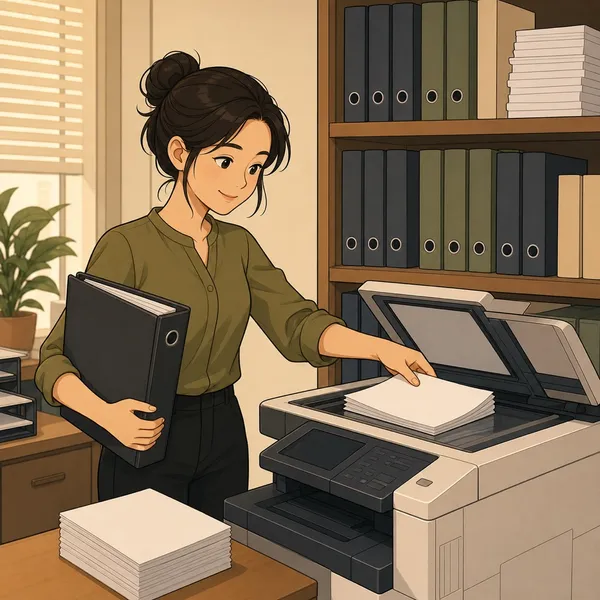



Same staff. Same fee. More clients.
The receipt work is the bottleneck. Remove it, and one person’s day looks completely different.
- 9am Sort the pile, glue onto A4
- 12pm Photostat, punch & file
- 3pm Punch calculator, key in one by one
- 7pm Peak season? OT sampai malam
- 9am Staff snap and upload the whole bag — minutes per client, no glue, no photostat
- 9.30am Everything read, keyed in and filed
- All day Staff just check, then export one Excel into your accounting software
- 6pm Balik on time — even in peak season
Illustrative day for a typical ~100-receipt client — see the numbers on your own receipts at the demo.
From paper pile to filed on the cloud
Snap it once. AccPilot reads it, gets it ready for your software, and keeps the clear copy — searchable, 7 years.
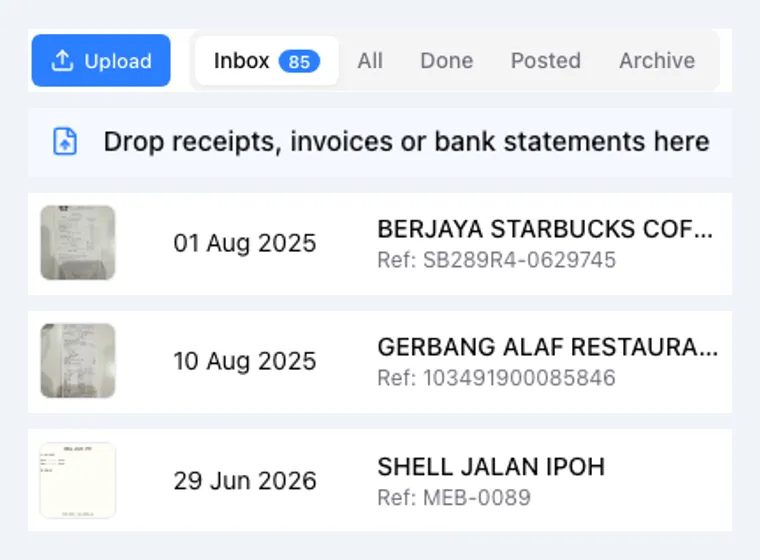
Get every document in
Snap a photo, drag a batch in, or let clients email it or upload through your link.
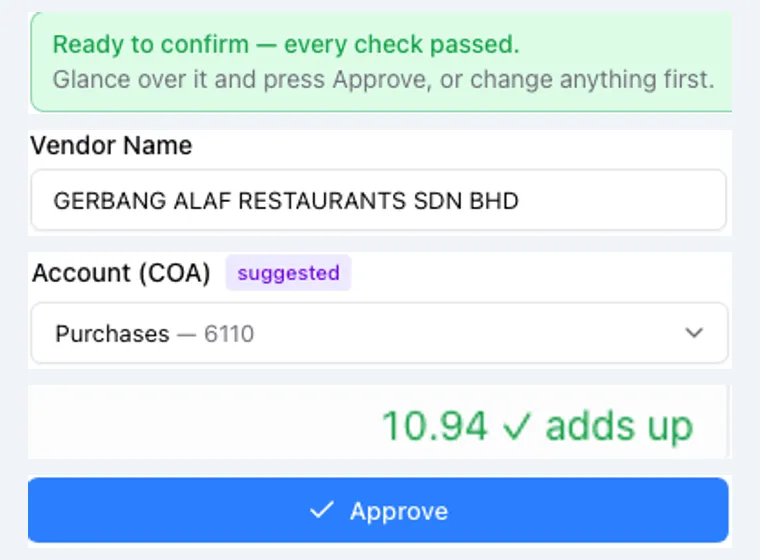
Read and checked
Vendor, date, amount, tax and line items read, with a suggested account — and a verdict: Ready, or Check with the reason.
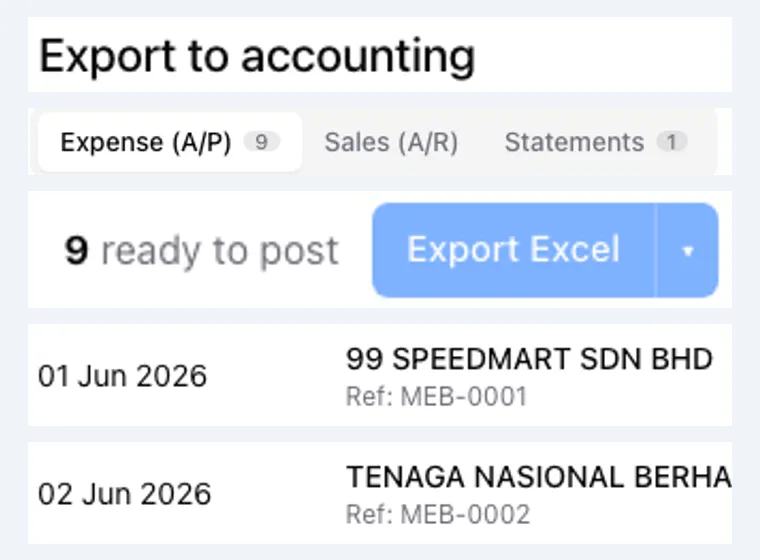
Confirm, then export
Give the flagged ones a quick look, confirm the rest, export one clean Excel into your accounting software. The copies stay filed on the cloud.
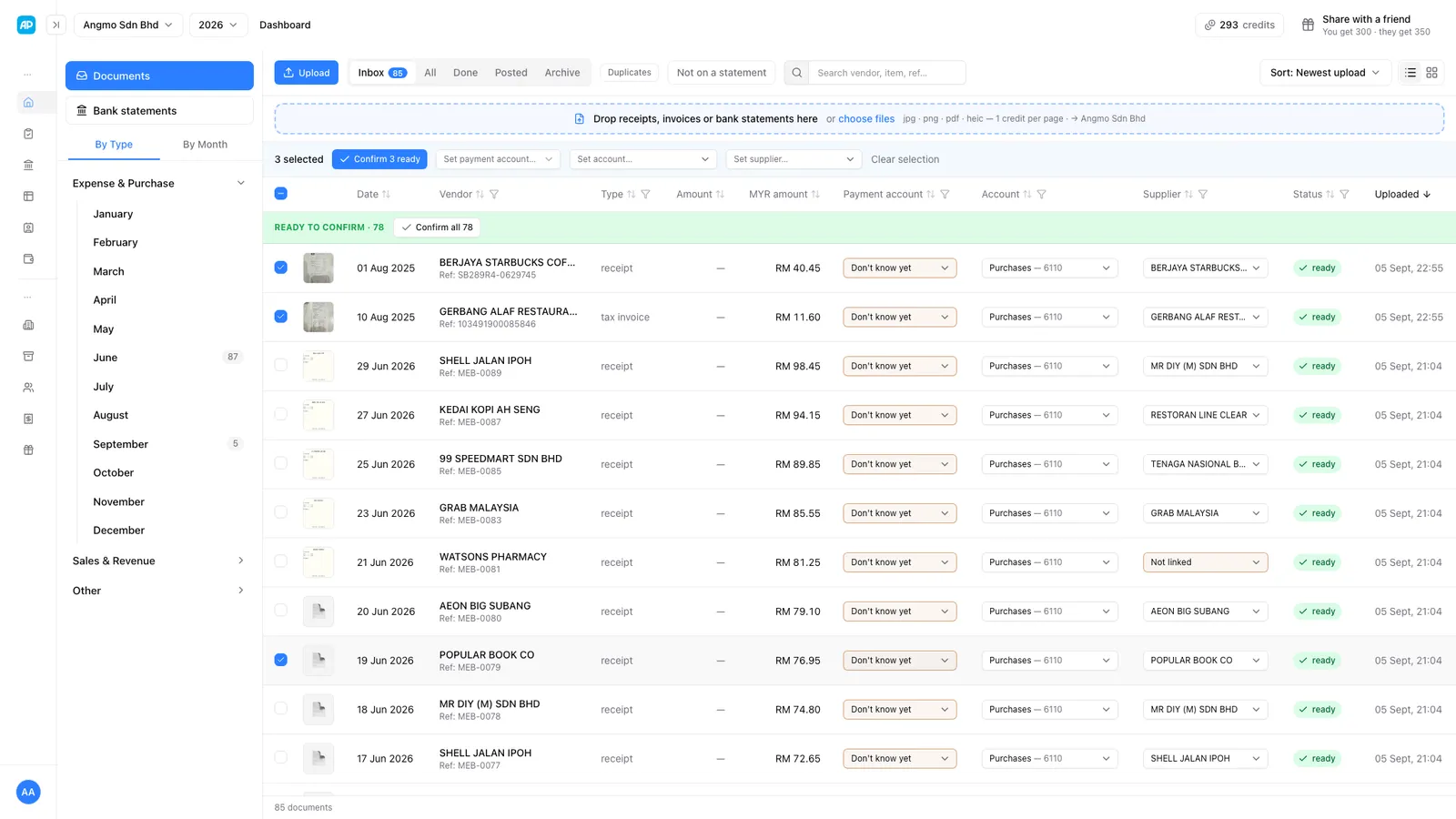
This is the actual AccPilot inbox — 78 documents read and ready to confirm, each with its suggested account and supplier. One click confirms them all.
Nothing to integrate. One clean Excel your software imports.
AccPilot doesn’t plug into your accounting software or replace it. Confirm the entries, download a self-describing Excel — postings, line items and a legend sheet — and import it the way you already do. Desktop or cloud, any package, no lock-in.
Find the missing receipts before year-end, not during the audit
The bank statement is the checklist. AccPilot reads it line by line and shows you exactly which receipts your client still owes you.
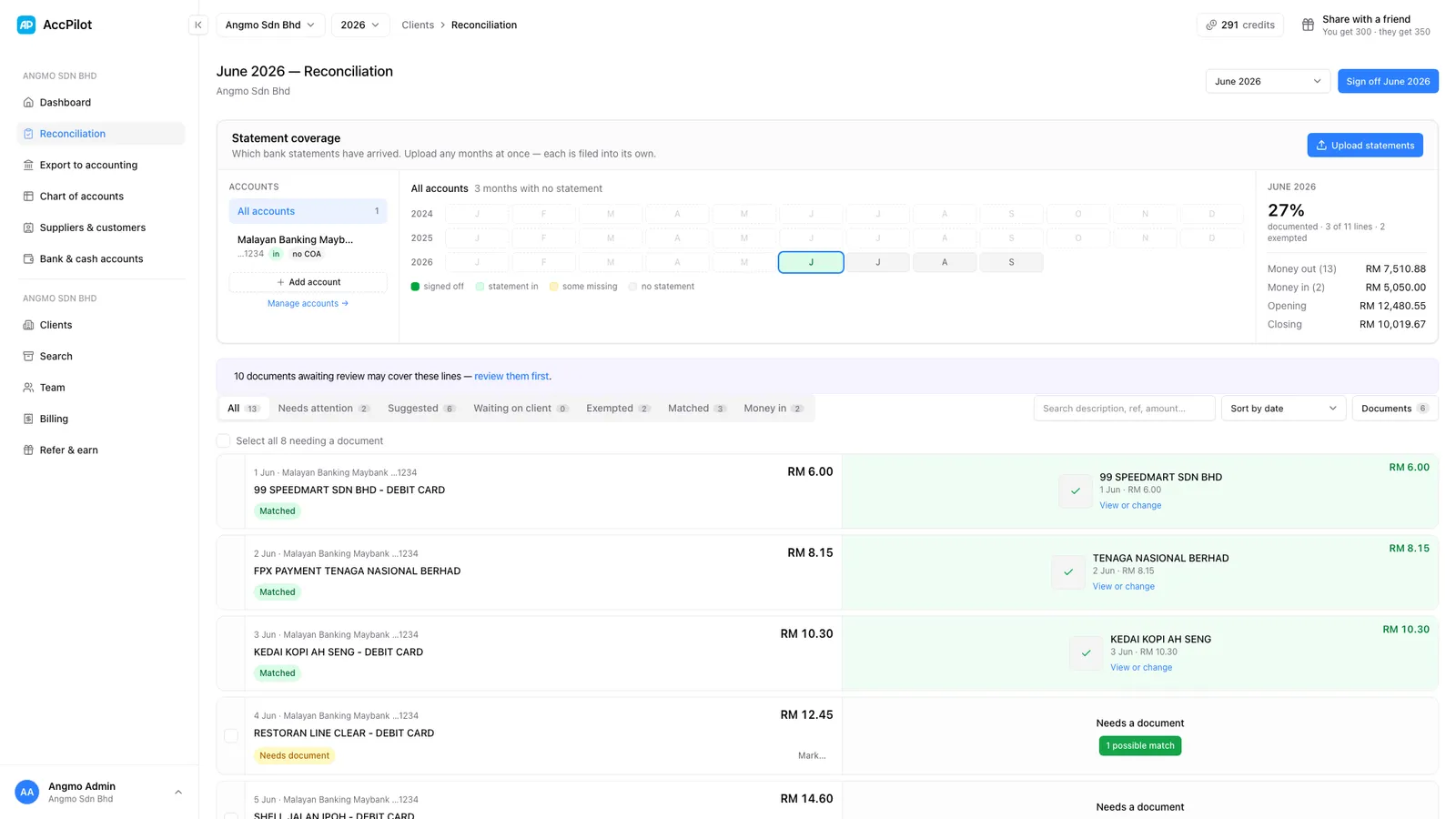
Statement coverage at a glance
One calendar per client shows which months have a bank statement in, which are signed off, and which are still missing — years back if you need.
Every line matched, or flagged
Each statement line sits beside the document that covers it. Lines with nothing behind them are marked “Needs a document”, with a possible match suggested when one exists.
Chase, then sign off
Select the lines that need a receipt and send the client one request through their link. A completeness figure tracks the month, and you sign it off when it is done.
“Month end used to mean printing, cutting and gluing hundreds of receipts onto A4 paper. Now my clients just snap them once. Everything is searchable, stored for 7 years, and ready whenever LHDN asks.”
Why Malaysian accountants try AccPilot
Less manual work, faster books — and you keep the software you already use.

One snap replaces the whole filing afternoon
Thermal receipts fade, so the old way is glue on A4, photostat, punch and file into lever-arch files — hours of work that adds nothing to the books. AccPilot keeps a clear digital copy that never fades.
- Snap once — clear copy kept 7 years
- No gluing, cutting or photostat
- No more cabinets of files to store
Search any receipt, kept 7 years
Every receipt is stored on the cloud and searchable by any word on it — vendor, date, amount, ref no — kept the 7 years LHDN wants, safe from fire, flood or a lost plastic bag.
- Search by vendor, date, amount or ref no
- Kept 7 years on the cloud
- Safe from fire, flood or lost paper
Works with the software you already run
AccPilot doesn’t replace your accounting software or plug into it. It hands you a clean, self-describing Excel — postings, line items, a legend sheet — that imports into whatever you run. Keep your system, your habits, your data.
- One Excel, any accounting package
- Nothing to install or integrate
- Nothing to rip out or relearn
Snap the receipt, skip the shoebox
The shoebox of mixed-up receipts becomes a photo. AccPilot reads each one and suggests the entry — no sorting on the floor, no keying by hand.
- Snap by phone, or clients upload through your link
- Vendor, date, amount and line items read for you
- One clean Excel for your accounting software
The manual way vs AccPilot
Same books, same accounting software — without the afternoons of paper.
| The manual way | ★ Faster AccPilot AccPilot | |
|---|---|---|
| Keep the proof | Glue on A4, cut, photostat | Clear copy on the cloud ✓ |
| Find an old receipt | Dig through boxes | Search in seconds, kept 7 years ✓ |
| Sort the receipts | Spread the shoebox on the table | Snap, auto-dated and sorted ✓ |
| Read the receipt | Key in by hand | Read for you, you confirm ✓ |
| Add up the totals | By calculator | Added for you ✓ |
| Hard / faded receipts | Guess or chase | Flagged for you to check ✓ |
| Missing receipts | Notice at year-end, if at all | Matched to the bank statement, chase list ready ✓ |
| Into your software | Re-type every entry by hand | Import one clean Excel ✓ |
Reflects the typical manual bookkeeping workflow vs AccPilot.
What early pilot accountants tell us
“I no longer chase clients for missing receipts or wonder where a file went. Every resit is in one place, and finding one from years ago takes seconds instead of half a day.”
“Our admin team stopped spending hours filing thermal receipts into folders. The cloud copy stays clear even after the original fades, which makes audit preparation much less stressful.”
See it on your own receipts.
Free demo, no obligation — we’ll WhatsApp or call you. Get set up before the year-end rush.
Book a free demoQuestions you might have
Anything else — leave your details and ask us on the call.
Book a free demoWhich accounting software does AccPilot work with?
Any. AccPilot doesn’t plug into your software — it exports a clean, self-describing Excel (postings, line items, a legend sheet) that imports into whatever you run. You keep the system you already use, and there is nothing to install.
Do I need to install anything?
No. AccPilot runs in the browser. Upload the documents, confirm the entries, download the Excel and import it into your accounting software — desktop or cloud, makes no difference.
What if a receipt is read wrongly and a wrong number goes into the books?
Nothing is booked without a human check. Every document comes back Ready, or Check with the reason — low confidence, totals that don’t add up, a suspected duplicate. You or your staff confirm before anything is exported. Blur, faded or handwritten receipts are flagged for you to key in — it won’t agak-agak the numbers into your books.
Can it read Malay and Chinese receipts?
Yes. Printed receipts in Bahasa Malaysia, English and Chinese — even mixed on the same receipt — are read fine. Handwritten or badly faded ones get flagged for a human check instead of guessed.
My clients are not tech-savvy. Do they need to learn an app?
No new app. Clients email the receipts, or open the link you send them and upload what you asked for. And if a client still passes you a plastic bag of paper, your staff just snap the receipts on their behalf. Nothing for the client to learn.
What about receipts that are missing?
AccPilot reads your client’s bank statement line by line and matches each line to a document — by reference, vendor and date, never by amount alone. Whatever has no receipt shows up as a list, with the chase message and your client link ready to send. So you find the gaps before year-end, not during the audit.
Is my clients’ data safe?
Your documents live in your firm’s own account, visible only to your team — with owner, manager and staff roles, two-step sign-in and an audit trail. Receipts are kept the 7 years LHDN requires, and you can export or delete your data anytime.
How much will it cost?
You pay for the documents you use, from one pool of credits shared across all your clients — not a fee per client, no lock-in, and you can cancel anytime. We’ll go through the plans together on the call, no obligation.
Is there a contract or lock-in?
No lock-in. Pay monthly, cancel anytime, and export all your documents when you go. Your books stay in your own accounting software either way — AccPilot never holds them hostage.
How hard is it to get started? I don’t have an IT person.
About an afternoon, not a project. Import your chart of accounts from Excel (or start from the standard Malaysian one) — we walk you through it at the demo — then upload a batch of receipts and watch them come back read and ready to export.
What about e-Invoicing (MyInvois)?
AccPilot handles the incoming side — the receipts and bills you receive from vendors. Issuing e-invoices stays in your accounting software. Cleaner, captured documents simply make the rest of your workflow easier.
What happens after I enquire?
We’ll WhatsApp or call you within a few working days, answer your questions, and set up a free demo — ideally on your own messiest receipts.
Will this replace my staff?
No. AccPilot clears the boring receipt work — reading, sorting, totalling — so your team is faster and handles more clients. The judgement, the advice and the client relationship stay with you.